Access Your Account
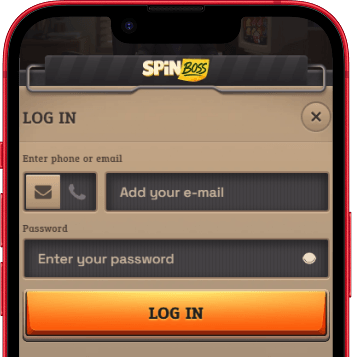
Signing in to SpinBoss works the same way on desktop and mobile. The login button sits in the top-right corner of the site header on all devices. Tap or click it, enter your registered email address and password, and you are in.
On mobile, the site is fully optimized for touch. The login form scales automatically to your screen, and the full account dashboard - including your balance, bonuses, and game history - is accessible from any smartphone or tablet browser without needing a separate app.
Having Trouble Signing In?
A few things worth checking before contacting support:
- Confirm you are using the email address registered to your account. Passwords are case-sensitive.
- Clear your browser cache and cookies, then try again. This resolves most session-related login errors.
- Disable any VPN or proxy before attempting to log in. SpinBoss does not allow VPN access, and an active VPN may block or restrict your session.
- If you have forgotten your password, use the reset link on the login page. A recovery email will be sent to your registered address within a few minutes.
- If none of the above works, contact the support team via live chat on the Help page. They can check your account status in real time.
New Player? Create an Account
Registration at SpinBoss takes about a minute. When you sign up, you choose your welcome bonus before making your first deposit. The casino package offers 400% up to €15,000 + 400 Free Spins. If sports betting is your priority, there is a separate sports welcome bonus of 100% up to EUR 100 (up to EUR 200 for players from Finland, Germany, Norway, Switzerland, and Austria).
-
Click "Get Started" and choose your welcome bonus. The registration form opens with a bonus selection at the top. Pick the casino welcome package, the sports bonus, or opt out if you prefer to play without a bonus. This choice is made once at signup and cannot be changed afterward.
-
Enter your email and create a password. These become your login credentials. If you have a promo code, enter it in the code field that appears after selecting your bonus. The code may unlock adjusted bonus terms or special offers.
-
Fill in your personal details. You will need to provide your full name, date of birth, gender, phone number, country, city, and postal address. This information is required for account verification and is handled in line with the privacy policy.
-
Complete registration and make your first deposit. Click "Create Profile" to finalize the account. Head to the Cashier to deposit - minimum EUR 20 for most bonuses, EUR 10 for the base deposit. Your welcome bonus activates on that first qualifying deposit.
After registering, you can upload your verification documents right away from the Account Verification section in your profile settings. Getting KYC done early speeds up your first withdrawal considerably.
Create Your AccountAccount Recovery
Resetting Your Password
If you cannot remember your password, click the "Forgot your password?" link on the login page. Enter the email address registered to your account and a reset link will be sent to that address. The link expires after a short time, so use it promptly. Once you have set a new password, you can log in immediately.
Once logged in, you can update your password at any time from the account settings area. It is a good idea to use a unique password that you do not use on other sites.
Locked or Restricted Accounts
Multiple failed login attempts can trigger an automatic temporary lock for security reasons. If your account is locked, wait a few minutes and try again, or contact the support team directly via live chat on the Help page. Agents can verify your identity and unlock your account after the standard security checks.
Accounts may also be restricted if there is a verification issue or if the account is flagged for review. In these cases, the support team will explain what is required to restore full access. Having your documents ready will speed up the process.
Can't Access Your Registered Email?
If you no longer have access to the email address on your account, contact support via live chat. You will need to verify your identity through alternative means - typically by providing personal details that match the account registration. Do not create a new account in this situation, as duplicate accounts violate the terms of service.
Login FAQ
Do I need an app to log in on mobile?
No. SpinBoss does not require a native app. The full site, including login, account management, games, and the sportsbook, works through your mobile browser. Simply visit the site address on your phone or tablet and everything is accessible with no download required.
Why is my login attempt being blocked?
The most common causes are an incorrect email or password, an active VPN or proxy, or a temporary account lock after multiple failed attempts. Disable any VPN, double-check your credentials, and try again. If the problem continues, contact the support team via live chat for a real-time account check.
Can I have more than one account?
No. Each player is permitted one account only. Duplicate accounts are against the terms of service and may result in both accounts being closed and any associated balances or bonuses being voided. If you cannot access your existing account, contact support rather than registering a new one.
How long does a password reset link stay active?
Password reset links expire after a short period - typically 15 to 30 minutes. If the link has expired by the time you open the email, simply request a new one from the login page. Make sure to check your spam folder if the email does not appear in your inbox within a few minutes.
When do I need to complete identity verification?
KYC verification is required before processing your first withdrawal. You can upload documents at any point after registration - going through Account Verification in your profile settings. Completing it early means there are no delays when you request a payout. Accepted documents typically include a government-issued ID and proof of address.